
Someone shares a GitHub link with you. Maybe it's an open-source security tool, a collection of compliance templates, or an automation project that looks useful.
You open the link and find folders, filenames, unfamiliar tabs, and a lot of technical information.
Where do you start? How can you tell what the project does, whether anyone maintains it, or whether it's safe and appropriate to use?
You don't have to read every file. You need to know where to look and what questions to ask.
This guide gives you three things:
- A repository reading guide to help you navigate an unfamiliar GitHub project and recognize useful signals.
- A five-minute inspection checklist you can use whenever someone shares a repository.
- Three free GRC Engineering Club resources where you can put these skills to work. No paid club membership required.
If you're new to the terminology, start with GRC Building Blocks: How to Speak Git (and GitHub). It introduces repositories, commits, branches, pull requests, and merges.
Now let's put that vocabulary to use.
Find Your Bearings
A repository, usually shortened to repo, is a project's workspace. It contains files, their recorded history, and often the discussions and workflows surrounding them.
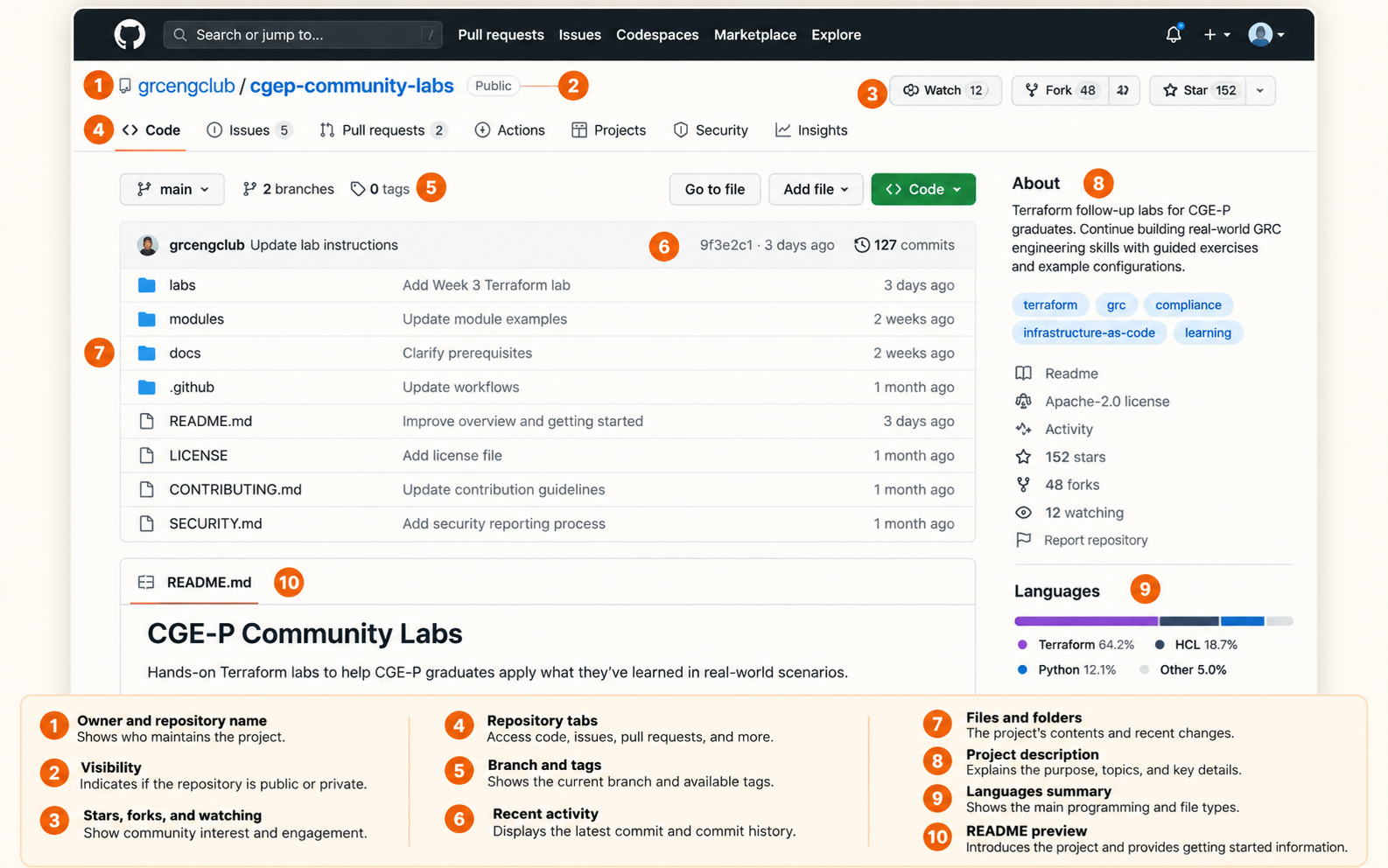
When you open a GitHub repository, start at the top.
Look for the owner and repository name. For example, in grcengclub/cgep-community-labs, grcengclub identifies the organization and cgep-community-labs is the repository name.
Then notice the navigation tabs. You may see Code, Issues, Pull requests, Actions, Projects, Security, and Insights. Not every repository uses every feature, and some tabs may be unavailable or hidden.
The Code tab is your starting point. It shows the project's files and folders, usually followed by a README.
Don't worry about understanding everything on the screen. Your first job is simply to figure out what you're looking at.
Check the Languages at a Glance
On many repository homepages, GitHub's Languages section appears in the right-hand sidebar, often with a colored bar and percentages. It gives you a quick sense of which programming or markup languages make up the repository's detected files.
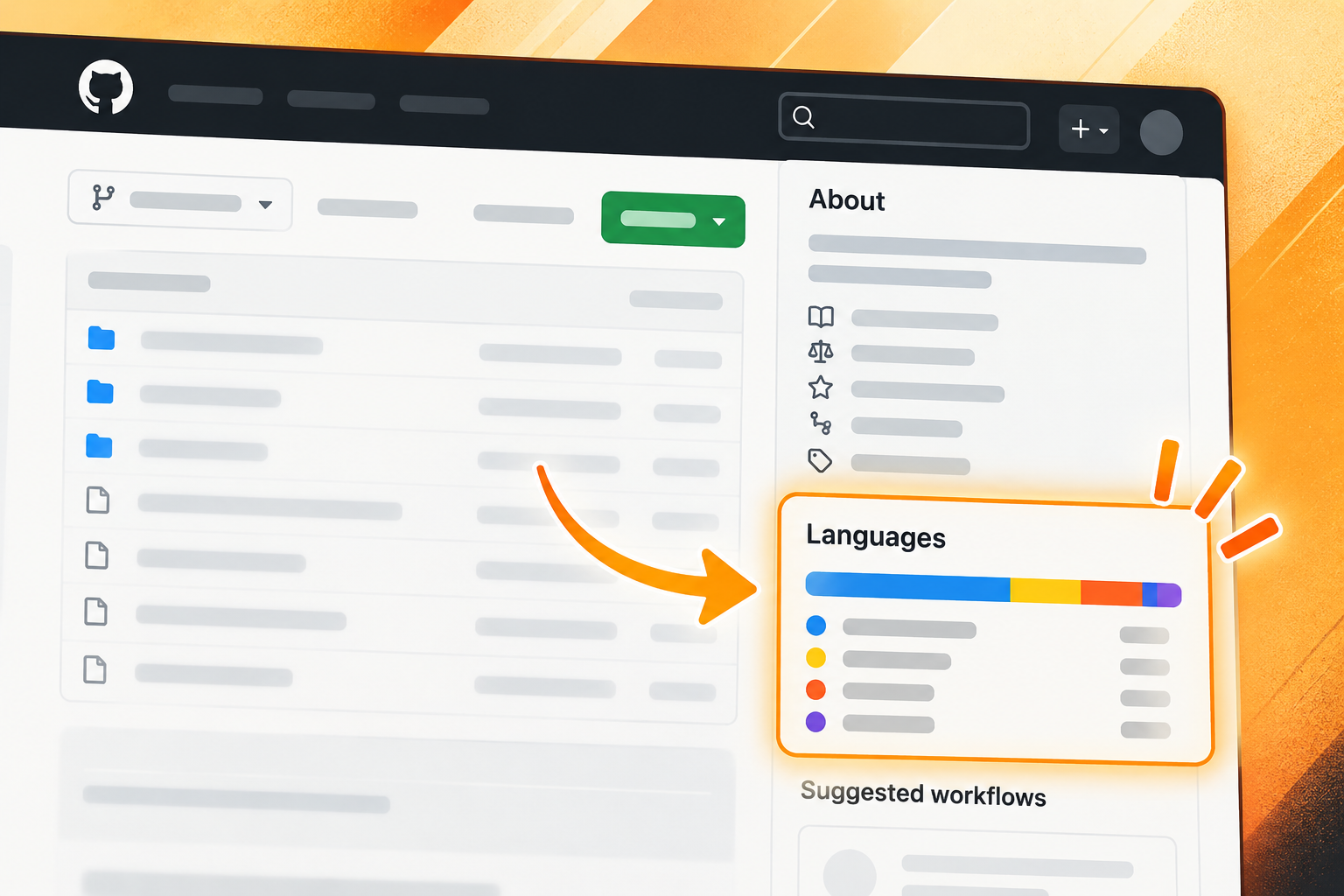
A repository showing mostly Python might contain scripts, data processing, or automation. TypeScript or JavaScript might suggest a web application or tool. HCL often points to Terraform infrastructure configuration. A repository showing mostly Markdown may be primarily documentation or learning materials.
This is a clue, not a verdict. GitHub calculates these percentages from detected file content, not from the project's importance or usefulness. Generated files, examples, and configuration can influence the breakdown, and some repositories do not show a Languages summary at all.
For GRC practitioners, a project with very little traditional code may still be valuable. Policies, control mappings, schemas, and lab instructions can be the entire point. Use the language summary to decide what to explore next, not whether the repository is worth exploring.
Try it on GitHub: Find the Languages section on a repository's Code page. Does its breakdown match what the README says the project does?
Scan the README First
The README.md file is usually the best place to start. GitHub commonly displays it beneath the file list, so you may already be looking at it.
Think of the README as the project's introduction.
You don't need to read it word for word. Scan the headings and look for answers to a few practical questions.
What is this project for? A good README should explain the problem being solved or the resource being shared. If you can't tell what the project does after a quick scan, that's worth noting.
Who is it for? Is it intended for developers, security engineers, auditors, students, or people learning a particular tool? A project can be perfectly legitimate and still be the wrong fit for you.
How do you use it? Look for getting-started instructions, examples, prerequisites, and dependencies. Some repositories contain documents you can read immediately. Others contain software that must be installed or configured.
What are the plans? Look for a roadmap, planned features, known limitations, or links to discussions about future work. Not every project needs a formal roadmap, but knowing what's finished and what's still experimental helps set expectations.
Where can you get help? Look for documentation, contribution instructions, issue-reporting guidance, or links to a community.
A polished README is useful, but it doesn't prove the project is reliable. Treat it as the beginning of your investigation.
Try it on GitHub: Open a public repository and scan its README for 30 seconds. Can you explain its purpose, audience, and how someone would get started?
Recognize the Files That Matter
A repository's file list can look intimidating, especially when you aren't a developer. Fortunately, a handful of filenames tell you quite a bit about how the project is organized.
| File or Folder | What to Look For |
|---|---|
README.md | Purpose, setup, examples, and project guidance |
LICENSE | Permissions and conditions for using or reusing the material |
CONTRIBUTING.md | How people can suggest changes or participate |
SECURITY.md | How to report security vulnerabilities |
CHANGELOG.md | A record of notable changes between versions |
docs/ | Additional instructions, explanations, or technical documentation |
tests/ | Tests intended to check whether parts of the project behave as expected |
.github/workflows/ | GitHub Actions workflows that may automate tests, checks, or publishing |
AGENTS.md | Instructions for AI coding agents working in the repository |
These are common conventions, not a mandatory checklist of files every reputable project must have.
A repository containing only policy templates may have no automated tests. A small learning exercise may not need a formal security reporting process.
Look for what makes sense given the project's purpose.
One more useful detail: folders beginning with a period, such as .github, are not necessarily suspicious. They're commonly used for configuration.
Check the Project's Activity
The README tells you what the project says it does. GitHub's activity records help you see what's actually happening.
Three places are particularly useful: commits, Issues, and Pull Requests.
Commits: What's Been Changing?
A commit records a set of changes in the project's history.
From the Code view, look for the commit history near the file list. Open it and scan the dates and descriptions.
Are changes recent? Do the descriptions explain what was changed? Is there a history of ongoing work, or does everything appear to have happened during one initial upload?
Recent activity can be encouraging, but older activity isn't automatically a problem. A stable reference document might not need frequent updates. Software that depends on changing services or security-sensitive libraries may need closer attention.
Ask whether the maintenance pattern makes sense for the kind of project you're evaluating.
Issues: How Does the Project Handle Problems?
An Issue is a GitHub record commonly used to report bugs, request features, ask questions, or track work.
Open the Issues tab, if it's available. You'll typically see open and closed issues.
Select one and look at its title, description, labels, and discussion.
A maintainer is someone responsible for managing or helping maintain the project. A contributor is someone who helps improve it, whether by reporting a problem, writing documentation, or proposing code.
Watch how maintainers respond. Do they ask clarifying questions? Explain decisions? Acknowledge problems? Close issues with useful explanations?
An issue that's been open for months isn't necessarily a warning sign. Some requests are complicated or intentionally deferred.
Likewise, a repository with zero open issues isn't automatically healthier than one with fifty.
The useful signal is how problems are handled, not simply how many exist.
Try it on GitHub: Find an issue with several comments. Can you identify the original problem, the discussion, and whether anyone has proposed a next step?
Pull Requests: How Are Changes Reviewed?
A Pull Request, often shortened to PR, is where someone proposes changes to a repository and gives others an opportunity to discuss or review them before they are merged.
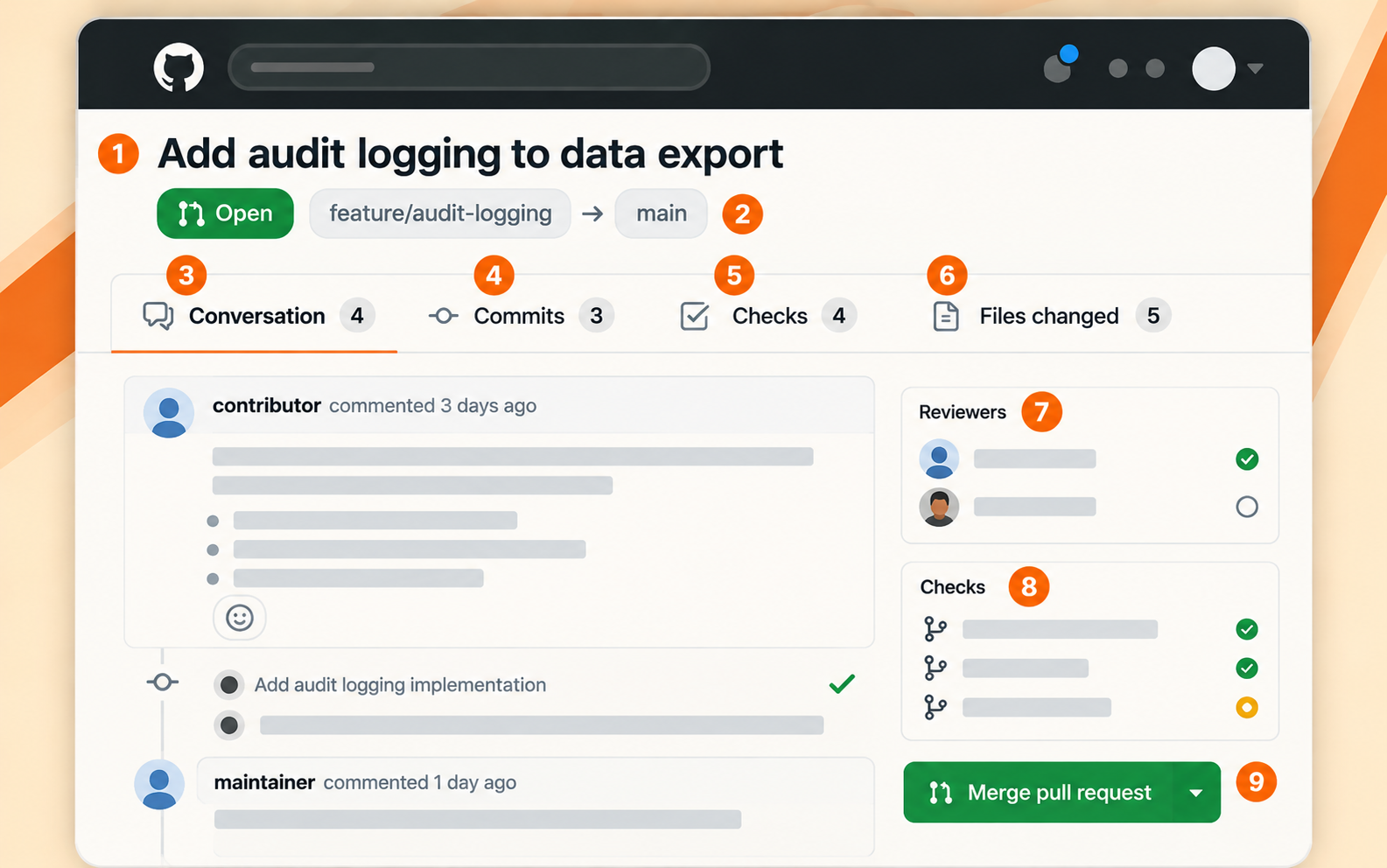
For GRC professionals, this can be one of the most interesting parts of GitHub.
Open the Pull requests tab and select a recent PR. Depending on its state and the repository's setup, you may find:
- Conversation: Why the change was proposed and what people discussed.
- Commits: The recorded changes associated with the PR.
- Files changed: The actual additions, deletions, and modifications.
- Checks: Automated tests or other workflows that ran against the proposed change.
- Reviews: Feedback, approvals, or requests for changes.
- Merge status: Whether the change was incorporated into the target branch.
You don't have to understand every line in Files changed to learn something. Start with the PR description, review comments, and check results; inspect the changed files more closely when the risk warrants it.
Suppose a PR proposes changing how an application stores audit evidence. You may be able to see who proposed the change, what concerns reviewers raised, whether automated tests passed, and how the discussion was resolved.
That's a useful window into technical change management.
But read the evidence carefully. A passing automated check doesn't prove a human approved the change. A merged PR doesn't necessarily mean an independent reviewer approved it. And a PR approval doesn't prove the change was successfully deployed to production.
These records help you investigate a process. They don't establish every control outcome by themselves.
Try it on GitHub: Open a merged PR. Can you identify what changed, whether someone reviewed it, and which automated checks ran?
Is This Repository Reputable?
There's no single GitHub badge that answers this question.
A repository might have hundreds of stars and still contain unsafe instructions. Another might have only a handful of users and be carefully maintained by an experienced practitioner.
Stars are a way for GitHub users to bookmark or express interest in a repository. Forks are copies of a repository that people can work on independently. Both can provide context, but neither is a security certification.
Instead, combine several observations.
Look at who owns the repository. Does the owner have a credible relationship to the project? Does the documentation identify the people or organization behind it?
Look at the project's history. Are changes explained? Are reported problems acknowledged? Does the maintenance pattern match the project's purpose?
Look for independent evidence where it matters. A software project may publish releases, tests, security guidance, or links to outside documentation. These can strengthen your confidence, but their presence alone isn't proof that the software is secure.
Finally, consider what the repository asks you to do.
Reading documentation is different from installing a package, running a script, or granting access to your cloud environment. You can inspect a public repository in your browser without downloading or executing its code. If you decide to run anything, review the instructions, dependencies, and requested permissions first.
If a project asks you to provide API keys, install software with elevated permissions, or connect sensitive systems, slow down and investigate those requirements before proceeding.
Never paste credentials into an issue, pull request, or public configuration file.
The level of scrutiny should match the potential consequences of using the project.
Don't Skip the License
A public repository is visible to everyone. That doesn't automatically mean everyone has permission to reuse its contents however they want.
Look for a LICENSE file or licensing information in the README.
| License | What It Generally Means |
|---|---|
| MIT | Permissive software license that allows broad reuse with required notices |
| Apache 2.0 | Permissive software license with additional patent-related provisions |
| GPL | Software license with copyleft obligations when distributing covered derivative works |
| Creative Commons licenses | Often used for documentation and creative materials, with conditions varying by license |
| No license | Public visibility alone generally does not grant broad reuse rights |
Licenses have different versions and conditions. Always check the actual license text and whether it covers the files you intend to use.
This matters especially when adapting compliance templates, copying code into company systems, or incorporating someone else's work into a commercial product.
A repository may be free to read but have restrictions on modification or redistribution.
And licensing is only one part of the decision. A permissively licensed tool can still be insecure, outdated, or unsuitable for your environment.
Your Five-Minute Repository Inspection Checklist
You don't need a full technical assessment every time someone shares a GitHub link. Start with a quick inspection.
- Purpose: Scan the README. Can I explain what this project does and who it's for?
- Languages: Does the code and file-type breakdown fit the project's stated purpose?
- Getting started: Can I find instructions, prerequisites, and limitations?
- Ownership: Do I know who maintains it and where it came from?
- Files: Can I locate the license and any relevant documentation, tests, or security guidance?
- Activity: Does the commit history make sense for this kind of project?
- Issues: Can I see how problems, questions, or feature requests are handled?
- Pull Requests: Can I find examples of changes being discussed, checked, or reviewed?
- Permissions: Do I understand what the license allows?
- Risk: Would using this require running unfamiliar code, sharing credentials, or granting sensitive access?
You might answer some questions immediately. Others may require more investigation.
That's the point. The checklist helps you decide whether to keep exploring, ask for more information, or avoid using something until you understand it better.
Practice With Three Free GRC Engineering Club Repositories
Now put your new skills to work.
The GRC Engineering Club maintains public repositories that you can explore without paying for a club membership. You can read their documentation, inspect their files, and see how the projects are organized.
Here are three places to start.
GRC Engineering Toolkit for Claude
Explore the Claude GRC Engineering Repository
Start by scanning the README. Look for the toolkit's purpose, the intended workflow, and what someone needs before using it.
Then examine the folders and documentation. What does the project provide, and what would you need to understand before applying it to your own work?
Community GRC Engineering Labs
These community-built Terraform follow-up labs are intended for CGE-P graduates. Even if you're not ready to run them, you can practice reading a repository organized around exercises.
Scan the README and look for how the labs are structured, what prerequisites they identify, and how someone is expected to work through the material.
GRC Engineering Certification Labs
Explore the Certification Labs
Use the same inspection process here. Look at the README, the exercise organization, and any instructions or prerequisites.
Public access to repository materials doesn't necessarily include certification, external services, or every tool an exercise may require. Check the specific instructions before starting.
Keep Exploring
You can find these and other public projects at the GRC Engineering Club's GitHub organization.
You don't need a paid membership to browse these repositories or begin learning from their public materials.
Try the five-minute checklist on one of them. Then try it on a repository you've never seen before.
Once you know where to look, GitHub becomes much less intimidating. You can begin understanding what a project does, how people work on it, what evidence its history provides, and what questions still need answers.
That's a practical skill for anyone learning GRC Engineering.
If you're ready to move from inspecting projects to building one, continue with the GRC Vibe Coder's Playbook.