Two risk registers can look almost identical. Each has owners, ratings, due dates, and a dashboard. Yet one depends on a person remembering every update, while the other notices when something important changes elsewhere in the security program and brings it to someone's attention.
That difference is worth understanding, especially if you're learning GRC engineering. The value of a risk register isn't how many columns it has or how polished its charts look. It's whether the register helps an organization explain its exposure, decide what to do, and notice when those decisions need to be revisited.
A good risk register documents risk. A better one helps people understand and act on it. A GRC-engineered register connects those decisions to the programs producing new information, so the record stays useful between formal review cycles. Let's work through those three levels using a fictional company, Peachtree Demo.
Watch the Risk Register Evolve
Read video description
A cluttered spreadsheet melts and reforms into a clearer risk register with rated risks, owners, and actions (Good). The same records become a dashboard showing priorities and overdue work (Better). A lost-laptop incident then surfaces as a candidate for review; a person reviews the signal before an existing endpoint-security risk is updated (Best). The closing maturity chart shows four stages: Spreadsheet, Good, Better, and Best, with Best highlighted as the goal. The animation illustrates a conceptual workflow, not a live integration or automatic risk approval.
Good: A Risk Record Someone Can Actually Use
Suppose Peachtree Demo discovers that some employee accounts with access to sensitive customer information aren't consistently protected by multifactor authentication (MFA). Its first draft describes the problem as “MFA missing,” assigns a High severity to IT, and leaves the status Open.
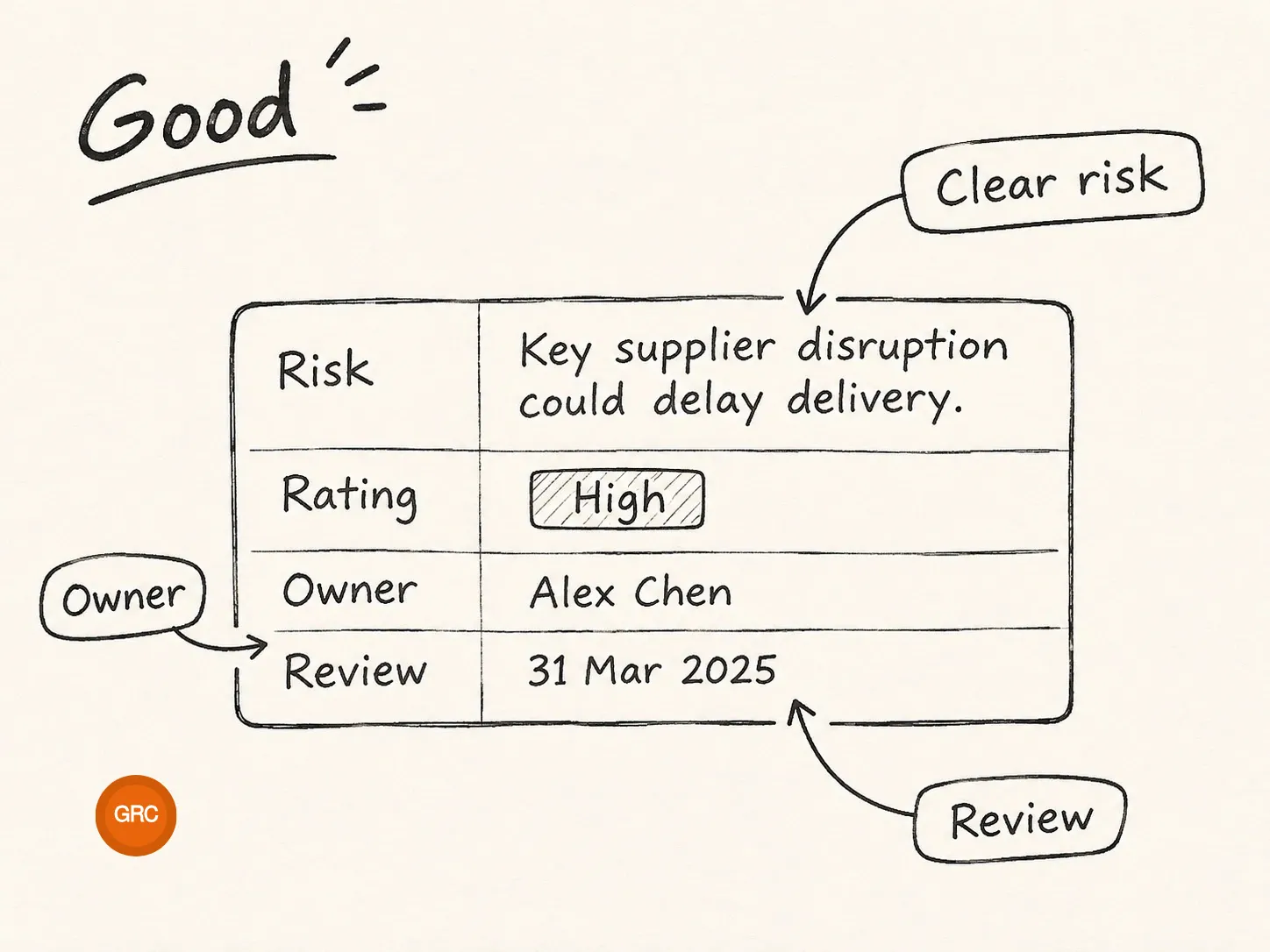
That's not useless, but it isn't much of a decision record. We don't know which condition creates the risk, what could happen, why the rating is high, or what progress would look like. A reader who didn't participate in the original assessment would have to ask for an explanation.
A more useful risk statement connects the condition, the possible event, and its consequence:
With a clear statement, the team can make sense of the rating and determine an appropriate response. It can identify which systems and accounts are affected, assign an accountable risk owner, link supporting findings, track remediation work, and schedule the next review. The organization might use additional fields for existing controls, inherent and residual ratings, approval history, or business impact. Those details should serve decisions rather than become extra columns nobody understands.
| Field | What it helps someone answer |
|---|---|
| Risk ID and statement | What could happen, why, and with what consequence? |
| Likelihood, impact, and rating | How do we assess and prioritize this risk, and why? |
| Owner | Who is accountable for the risk decision? |
| Source and related records | Which finding, incident, assessment, or change brought this to light? |
| Response and actions | Will we mitigate, avoid, transfer, or accept it, and what happens next? |
| Status and review date | What changed, what remains open, and when will we revisit it? |
A simple register with these essentials can outperform an elaborate spreadsheet full of unclear entries. This is the first level: good records that let people understand and act on individual risks.
Better: A Dashboard That Explains the Risk Picture
The people maintaining the register aren't the only ones who need it. Leadership wants to understand the biggest exposures. System owners want to know which treatments need attention. Auditors need to follow a risk decision to its source and supporting evidence. Those audiences usually don't want to read every row of a register to find what matters.
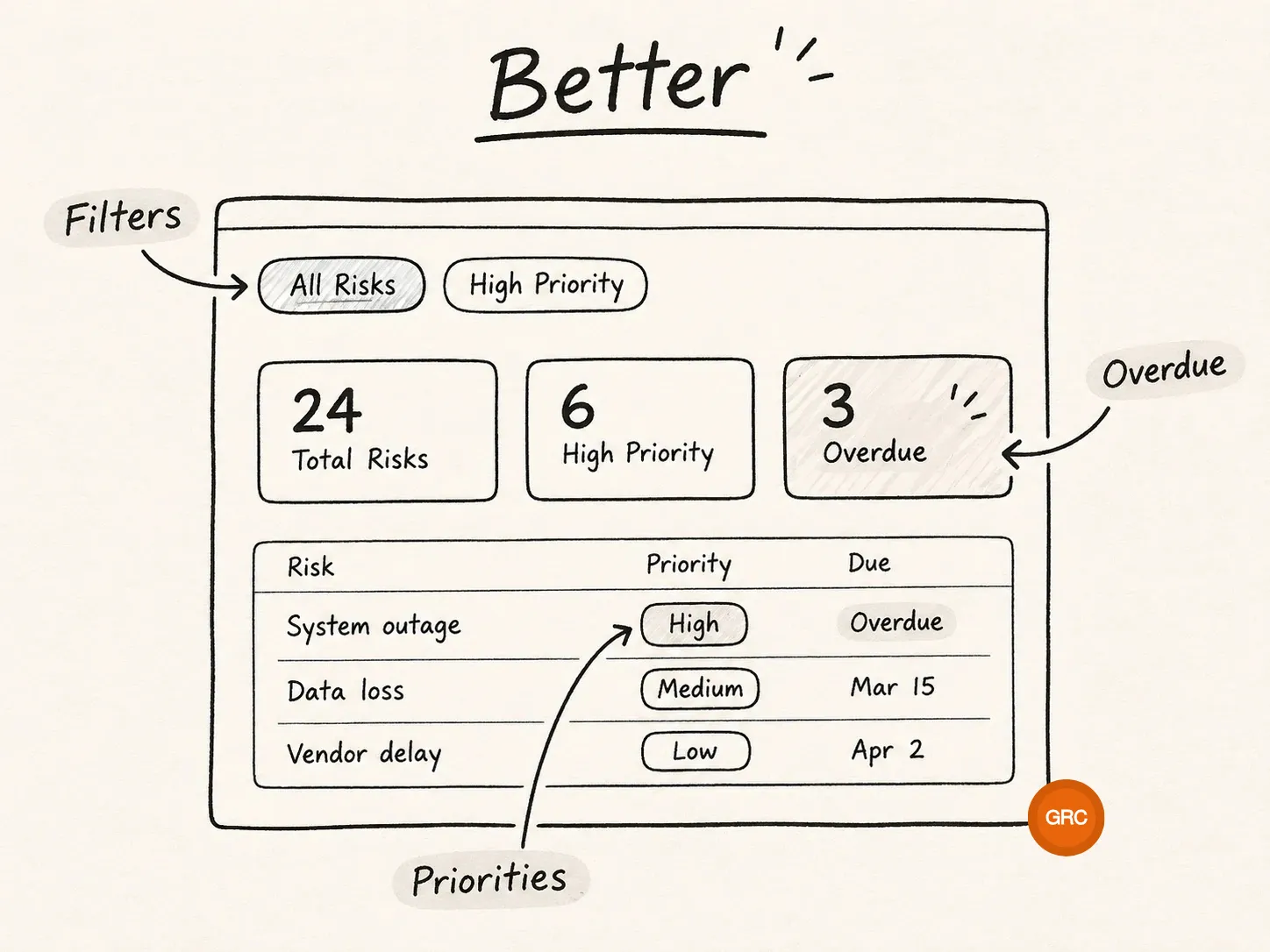
A better register includes a thoughtfully designed view of the same underlying records. Clear severity labels, consistent categories, meaningful filters, and readable status indicators make the information easier to navigate. One person may filter to vendor risks, another to overdue treatment actions, and another to risks whose ratings increased since the last review.
A good dashboard should answer a few questions at a glance, while letting readers open the records behind each summary:
- Which risks are highest priority, and in which categories?
- Which treatment actions or reviews are overdue?
- Which risks are accepted, and which are actively being treated?
- What changed since the last assessment?
The labels and underlying context still matter. A red bar alone isn't an explanation, and a trend line can mislead if the team's rating definitions or the population of risks changed.
This is why interface design matters even though the interface isn't the risk-management process itself. The dashboard gives people a shared picture of the decisions they're navigating, without asking the practitioner to rebuild the same explanation every time someone asks a question.
The risk record helps practitioners manage an issue. The dashboard helps everyone else understand the risk they're navigating.
Best: Engineer the Connections Behind the Register
Now imagine the dashboard looks much the same, but behind it the security program has an additional capability: it can identify when new information elsewhere may warrant a risk review.
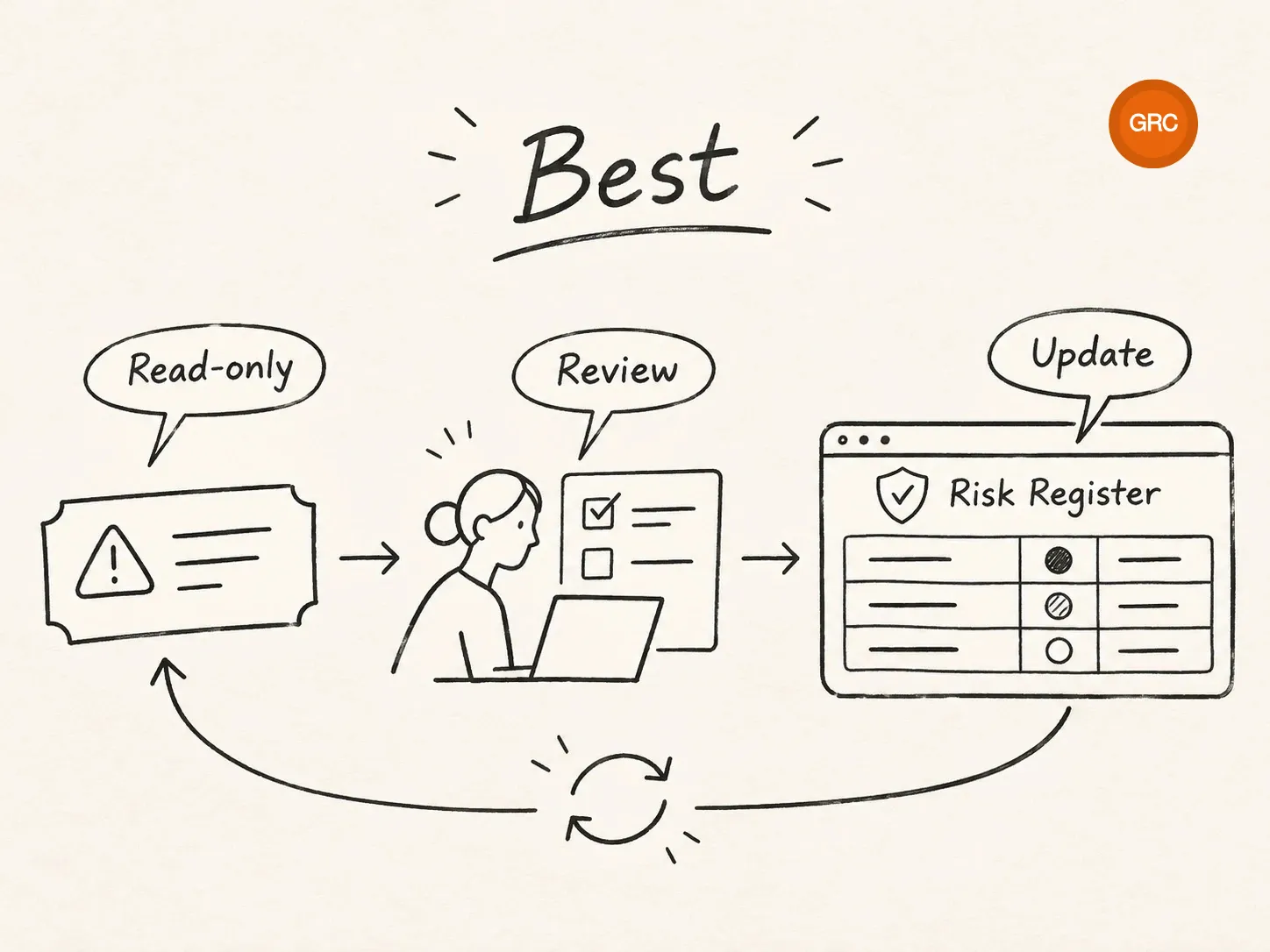
Peachtree Demo tracks security incidents in a ticketing system. Its GRC application stores assessed risks. A GRC engineer configures a read-only API integration, or an appropriately permissioned Model Context Protocol (MCP) connector, that regularly checks incident tickets for new or materially changed records. The integration might use a saved checkpoint so it doesn't treat the same incident as new every time it runs.
One morning, someone reports a lost company laptop. Rather than waiting for the next scheduled audit preparation session, the integration surfaces a candidate risk-review notification with the ticket reference, relevant date, asset category, and available classification. The reviewer can follow the link to the incident system, compare the issue with existing risks, and determine whether the record needs to change.
That may mean linking the incident to an existing endpoint security risk. It may mean reassessing the likelihood or treatment of that risk, or adding a new entry if the event reveals a previously unrecognized exposure. It may also mean documenting why no change is necessary. An incident is an input to risk judgment, not an instruction to create another risk row automatically.
An integration of this kind needs a few unglamorous but important safeguards. The incident-system credential should actually be restricted to the approved read-only operations. The workflow should avoid duplicate prompts, report failed scans, preserve source-ticket references, and limit exposure of sensitive ticket details. The authorized GRC workflow, rather than the read-only connector, is responsible for saving a reviewed change to the risk register.
This goes beyond adding a task to an incident workflow. A task depends on someone choosing to create it. The engineered connection continuously compares a defined source of operational information with the risks being managed and identifies cases that deserve attention.
The automation doesn't decide what the organization should fear. It makes sure new information reaches someone who can assess what it means.
The same principle applies beyond incidents. A vendor review may identify an unresolved supplier weakness. A vulnerability scan may reveal a repeated exposure on a critical system. Threat intelligence may change how the organization thinks about a specific attack path. An audit finding may show that a control isn't operating as expected. Instead of creating one risk for every observation, a connected process helps the team correlate signals, update existing assessments, and identify meaningful gaps.
For ISO/IEC 27001 programs, this connection is useful to demonstrate. Risk assessments are expected at planned intervals and when significant changes occur, and incidents can produce lessons that improve security practices. A lost laptop does not automatically require a separate risk register entry. The important question is whether the organization considered what the incident revealed and can explain the resulting risk decision.
Two Pitfalls That Can Undermine Any Level
The first is treating a rating as the whole explanation. A risk marked High may demand attention, but readers need to know why. A useful record preserves the rationale for likelihood and impact, identifies the relevant conditions, and makes clear what new evidence could change the assessment.
The second is automating an undefined process. If a vulnerability scanner creates a new risk for every finding, the result may be hundreds of duplicate records that overwhelm reviewers. Define what constitutes a risk, how it relates to findings, who has authority to assess it, and what evidence should be preserved before connecting systems. The engineering should improve judgment, not bury it.
Learn the Pattern, Then Build Other Registries
Once you understand how to make one registry useful, you'll start recognizing the same design problems elsewhere in GRC. A vendor register, AI inventory, exception register, and asset inventory all need dependable identifiers, responsible owners, classifications, sources, review dates, and meaningful status changes. Their requirements are different, but many of the underlying engineering patterns are reusable.
A vendor registry might connect to procurement information and periodic security reviews. An AI inventory might record approved use cases, providers, responsible teams, data types, and reassessment triggers. An exception register might link deviations to related controls and expiration dates. In each case, the useful questions remain familiar: What belongs in this record? Where does new information come from? Who decides what changes? How do we explain the result to someone else?
You don't need to build a new application for every one of these ideas. Learning how to model records, validate inputs, preserve decisions, and connect source systems gives you a foundation that transfers from one workflow to another.
Try It Yourself: A Small Risk Register Lab
Start with three fictional risks in a spreadsheet or a small application. Make each entry clear enough that someone else can understand the concern, rating, owner, treatment, and current state. Build a dashboard that answers what needs attention, who owns it, and what changed. Then introduce a fictional lost-laptop incident from a sample ticket file.
Before writing an integration, decide whether the incident belongs under an existing risk and what a reviewer would need to know. Next, simulate the discovery step: read the sample ticket, compare it against the register, and generate a candidate review, not an automatic approval. Synthetic data is enough to learn the principle without connecting to a live incident system.
If you'd like to learn more about making a small working GRC application, the GRC Vibe Coder's Playbook covers how to plan, build, check, and improve an AI-assisted project. Use those lessons to define the behavior before you build the interface.
A good risk register documents risk. A better one makes it understandable and actionable across an organization. A GRC-engineered register connects risks with the systems revealing new information, so assessments have a clearer path to stay current. The dashboard might look familiar, but the work happening behind it is what makes the register a living part of the program.